Commercial smart home sensors often cost $60-$100 each for basics like motion or humidity detectors, pricing out whole-home setups for most budgets. As someone who's wired multiple homes this way, I can show you how to build reliable ones for under $10 per node.
The MySensors.org community has done the heavy lifting with their versatile framework. This guide draws from my hands-on experience integrating MySensors nodes with OpenHAB (check our Getting Started with OpenHAB on Raspberry Pi guide). OpenHAB is a robust, open-source home automation platform that's hardware-agnostic and excels at connecting diverse devices. I assume you have an MQTT broker running—see the OpenHAB follow-up for setup details. While I'll focus on Arduino nodes sending data via MQTT to OpenHAB, MySensors works with many controllers.
Hardware for my setup costs less than $10 per node (slightly more for the gateway). Add sensors like DHT11 ($1 each) or relays ($3) affordably.
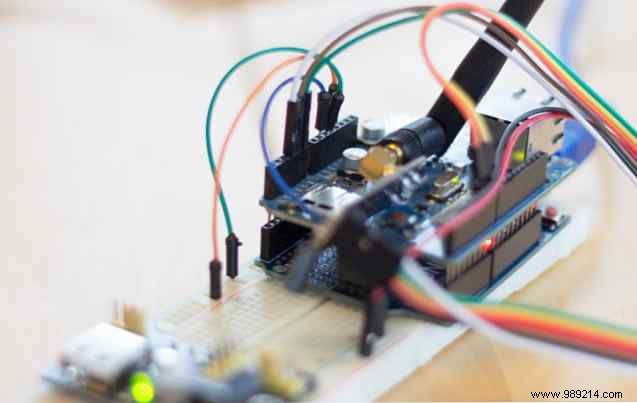
Skip unreliable Wi-Fi or pricey Ethernet shields cluttering your network. Instead, create a dedicated, mesh-capable nRF24L01 radio network for Arduinos, bridged to your LAN via one Ethernet gateway. We'll build sensor nodes and the gateway to feed data to OpenHAB.
This suits my spotty Wi-Fi; for Wi-Fi fans, consider the budget ESP8266 (Meet the Arduino Killer: ESP8266).
El Capitan/Arduino Clone Note: Apple's update broke CH340 drivers on clones. Check the chip near USB—if CH340, disable kext signing and reinstall drivers here.
Gateway:
Each Sensor Node:
Optional:
These are finicky but powerful. I recommend +PA+LNA versions for range, but test basic ones first unless you have thick walls like mine (1km claimed range reaches my garden shed).
Test first: Wire two modules per MySensors diagram (pins same for Uno; connect from bottom):
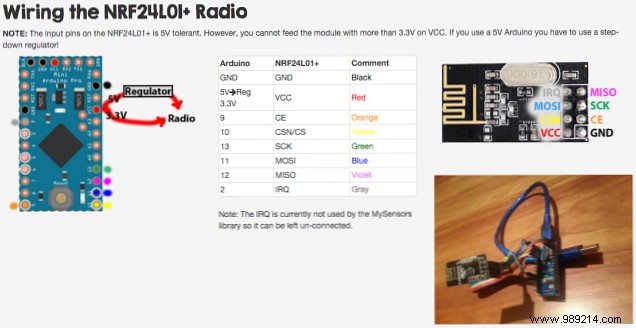
Install RF24 library, run Getting Started sketch. Power both, serial monitor on one, send 'T'—expect pings.
Download MySensors development branch (v1.5 used here; MQTT client not in stable). Backup libraries, replace with included ones.
Use MQTTClient gateway (not server variant—we forward to Pi's MQTT).
Gateway wiring (Ethernet + radio conflict SPI):
Uncomment #define SOFTSPI in MyConfig.h (~line 309).
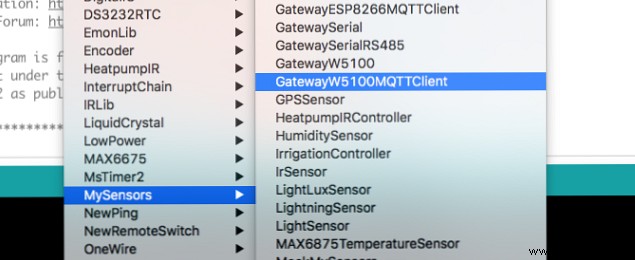
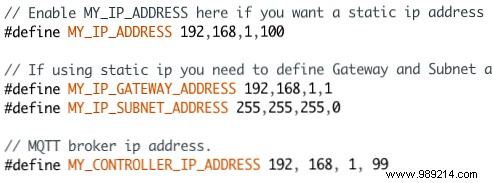
Load MySensors/GatewayW5100MQTTClient. Set static IP, subnet, MQTT server IP. Customize topic prefixes. Connect Ethernet, check serial for errors.
Re-comment SOFTSPI in MyConfig.h (use hardware SPI).
Standard wiring (+ sensor, e.g., DHT11):
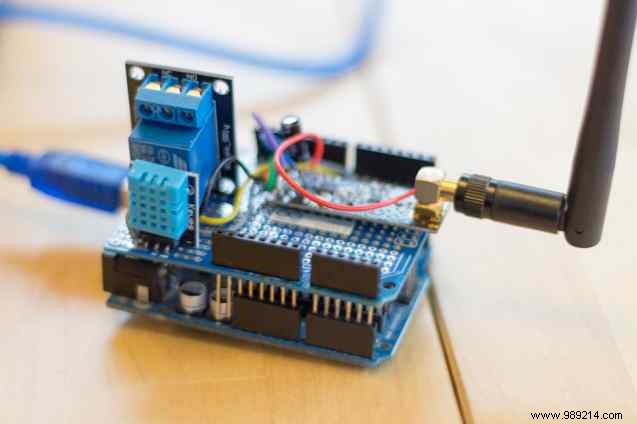
Load Humidity Sensor example. Add:
#define MY_NODE_ID 2  // Unique per node
#define MY_DEBUG
#define HUMIDITY_SENSOR_DIGITAL_PIN 7
Upload, monitor serial: st=ok confirms sends (fail? Check ID/gateway).
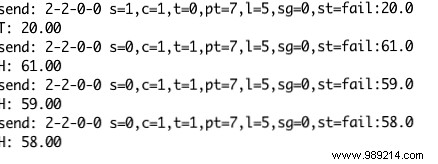
Data hits MQTT; integrate in OpenHAB (see guide part 2).
Merge examples (e.g., humidity + relay). Use non-blocking loops for stability. Full code here. Control relay via:
mysensors-in/9/1/1/0/2(0/1 payload).
Arduino memory limits nodes, but my MySensors setups outperform $80 Z-Wave units in reliability.
Troubleshoot on MySensors forums. What's your smart home project?
