Your Amazon Echo does more than control lights, play music, or manage shopping lists—it's an invaluable hands-free tool for reading recipes aloud while you cook. With just a few straightforward steps, build an audio recipe library and say goodbye to juggling cookbooks or screens amid chopping, whisking, and frying.
In three simple steps, transform any recipe into an audio file, upload it to your Amazon Music library, and command Alexa to play it. Repeat the process for your favorites to create a personalized collection, which you can organize into playlists for easy access.
Select your recipe and use a text-to-speech service like TextToSpeech to generate an MP3 file. Paste the ingredients with quantities and step-by-step instructions, then hit 'Create Audio File'.
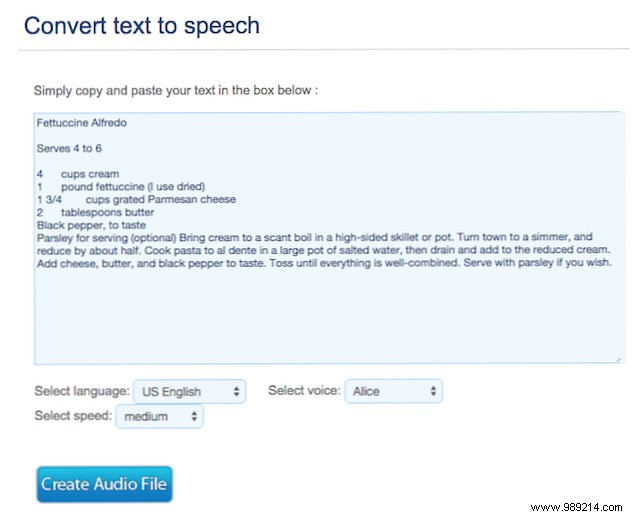
Choose from options like language, speed, and various male or female voices to match your preference.
Other reliable text-to-speech tools include Windows Text to MP3 Converter apps (with a free trial) and the free Balabolka.
If synthetic voices don't appeal, record the recipe yourself using your phone—though it takes more time.
Next, use the Amazon Music desktop app to upload each MP3 to your account (up to 250 tracks free). Edit song info for easy searching: in your library, right-click the file and select 'Edit Song Info'.
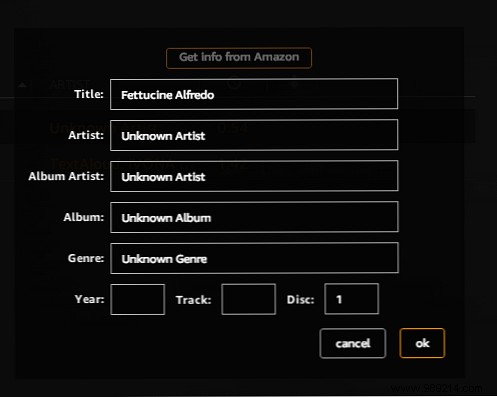
In the kitchen, say: “Alexa, play [Recipe Title].” Pause or resume as needed with voice commands. To repeat a step, say “Alexa, rewind 5 seconds” (adjust time as desired).
Have you tried using Amazon Echo for kitchen recipes? Share your favorite hacks in the comments!
